
Teaching Resources for the Universal Design for Learning
Universal Design for Learning (UDL) recognizes that students have a diverse range of abilities and experiences, and provides multiple means of learning and expression for these students. By prioritizing accessibility in a course, instructors design their course from the vantage point of multiple perspectives, creating learning experiences that can engage a diverse group of students.

The UDL Framework
Developed by the Center for Applied Special Technology (CAST), Universal Design for Learning (UDL) is “a framework to improve and optimize teaching and learning for all people based on scientific insights into how humans learn.” UDL evolved from an attempt to remove environmental barriers that obstruct any person’s ability to fully participate in society.
In education, UDL promotes and designs for accessibility and equity, accommodating all teaching and learning styles and preferences. UDL recognizes that there is no single way to learn, whether receiving, processing, or expressing knowledge. UDL is a supportive, inclusive practice that helps all students learn.
The UDL Guidelines
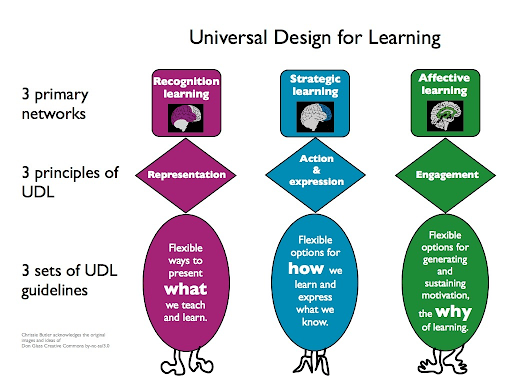
CAST’s guidelines concern providing multiple means of engagement, representation, and action and expression. UDL considers three main forms of learning: recognition learning, strategic learning, and affective learning, as detailed in the graphic on the right, as well as this more detailed, downloadable resource from CAST.
Research on student learning demonstrates that multi-modal access helps to improve learning outcomes for all students. Multi-modal access essentially means providing several pathways to access course material. UDL also advocates multi-model means of expression for students to demonstrate their learning.
Implementing UDL in Your Course
The University of Washington’s “DO-IT” project explains: “To apply UDL, instructors should consider the potential variation in individual skills, learning styles and preferences, age, gender, sexual orientation, culture, abilities, and disabilities as they select appropriate content and strategies for the delivery of instruction and then apply universal design to all course activities and resources.”
Katie Novak (2022, p.26) asks instructors to consider these essential questions as they implement UDL in their courses:
- What do all students need to know or be able to do?
- What barriers to learning might students face?
- How can I design the course and assessments so that all students can learn and demonstrate their learning?
Planning Your Course
- Select accessible materials from the start where possible, including software, apps, and tools that supplement the delivery of course content.
- Make course materials accessible. For text-based documents, such as PDFs, ensure they are accessible to screen readers, and use clear fonts and spacing, using built-in Accessibility checkers in Canvas, Microsoft Word, or Adobe Acrobat. Use captions for all instructional images, video, and audio content. Provide alternative text for visual content.
- Offer options for demonstrating knowledge, allowing choice in topics and format when designing assignments. Instructors define what students need to demonstrate knowledge of or ability in, but individual students exercise flexibility in how to demonstrate their learning by choosing preferred mediums of expression.
- Consider utilizing a range of options across the duration of your course for students to demonstrate course mastery. Avoid bias towards only one mode of expression (i.e., only accepting written work). Consider oral submissions, video submissions, class presentations, and other modes of demonstrating learning mastery.
- Consider the variety of students in your course, and plan with them in mind. Penn State World Campus developed a set of personas and their needs that may be useful to consult.
Teaching Your Course
- Begin class with goal setting: List on the board and audibly state the what (purpose) and how (tasks) of each session.
- Engage responsively and respectfully with official accommodations by working with students to support their needs for student success. Most accommodations provided (e.g., 2x time on tests) set a minimum standard for instructors and should prompt instructors to engage directly with learners about their needs.
- Read and describe the information that is on your slidedeck or written on the board during class or a recorded lecture; don’t assume everyone can see it clearly. Write clearly and legibly, using a darker whiteboard marker. Ask the class: can you see that? can you read that?
- Examine the physical space for learning for accessibility. Can students see and hear clearly? Can they move around freely? Is there proper lighting/temperature? While it may be impossible to create the ideal classroom climate due to factors outside your control, simple strategies like closing blinds in the front of the room and turning off any lights that shine on the screen if you are projecting material may be possible.
- Seek student input on teaching strategies through surveys or other methods to discover individual strengths and needs, preferences for expression and engagement, and responses with the activities and assessments that you employ.