Raise the Alert: One Report Can Protect the Campus
In this issue, we’ll look at what a cybersecurity incident can look like, situations you should report, how one phishing report can protect our campus community, and how to raise the alert when you encounter something suspicious.
A suspicious email. An unexpected Duo request. A lost university device. Sensitive information sent to the wrong person.
These situations may look very different, but they have something in common: they’re all worth paying attention to and, when appropriate, reporting. Cybersecurity is a community effort. Whether you’re a student, faculty, or staff member, what you notice can make a difference.
You don’t need to be a cybersecurity expert to recognize when something doesn’t look right. You don’t need to know exactly what happened or investigate it yourself. Sometimes, the most important thing you can do is simply raise the alert.
What Is a Cybersecurity Incident?
A cybersecurity incident is an event that could compromise the security of a Montclair account, system, device, network or information.
To put it simply, something happened that shouldn’t have happened or something happened that makes you concerned about the security of university technology or information. That doesn’t necessarily mean you’ve been hacked. It could be an attempted attack, a mistake, suspicious activity, a lost device, or simply something that needs to be investigated.
Maybe you receive a Duo request you didn’t initiate. Maybe you realize you’ve sent sensitive information to the wrong person. Maybe your phone or laptop you use to access Montclair accounts goes missing, or your computer starts behaving strangely.
You don’t need to know exactly what happened before you report it. That’s the point of reporting.
Reporting Is a Community Defense
Reporting isn’t about proving something is fake. It’s about giving Montclair visibility into something that may need attention.
A suspicious message might be targeting hundreds of people. An unexpected Duo request could be the first sign that an account is at risk. Even an accidental disclosure can require a quick response.
Your Report Matters
You might think, Someone else probably already reported this. Or maybe you’re worried that Information Security is already receiving too many messages. Don’t let that stop you. Your information could help the university understand the situation better.
Every report helps provide more pieces to the picture. Multiple reports can help us understand how widely something is circulating, who may have been targeted, and how quick a response may be needed. And your report could be the first one the team sees.
You don’t have to worry about sending “too many” reports. If something looks suspicious, your report is appreciated and helps us protect the entire campus.
How to Raise Alert
Whether you suspect a digital threat, experience a critical security breach, or misplace a device, follow the appropriate reporting pathway to ensure immediate response and containment.
Phishing & Suspicious Emails
If you receive a suspicious message, an unexpected attachment, or suspect a phishing attempt:
- Phish Alert Button (PAB): Click the Phish Alert Button located in Gmail to automatically report and quarantine the message.
- Email Reporting: If the PAB is not visible, forward the suspicious email directly to phishfiles@montclair.edu
General Cybersecurity Concerns (Non-Emergency)
For general security questions, non-critical policy reports, or non-urgent security issue:
- Report a Cyber Security Incident: Submit a ticket through this Report a Cyber Security Incident link via ServiceNow for further investigation by the Information Security team.
Critical Cyber Security Incidents
For active, high-priority threats such as account compromise, unauthorized access, or active ransomware/malware infections:
- Call Immediately: Call the IT Service Desk directly for immediate emergency triage.
- Crucial Rule: Do NOT submit a standard ServiceNow ticket or email. Urgent cyber threats require real-time response to lock down account and isolate affected devices.
Lost or Stolen Devices & Campus IDs
Losing a device or access card poses both physical and data privacy risk:
- University-Owner or Network-Connected Devices:
- Call Immediately: Call the IT Service Desk immediately so technical teams can revoke permissions, reset credentials, and initiate a remote data wipe.
- My Device Portal: Log into the My Device Portal with your NetID to manage, flag, or unregister a lost device.
- Personal Devices Lost on Campus:
- Visit the Student Center Information Desk (Primary Lost & Found) found on the 2nd Floor of the Student Center.
- University Police: If you suspect theft or lost a high-value item (laptops, phones, and tables), contact University Police.
Unsure how to classify what you’re seeing? That’s okay. You don’t need to diagnose the issue, determine whether it’s malicious, or investigate it yourself. The appropriate team can review the situation and determine what happens next.
What Should You Report?
Not every cybersecurity concern looks the same. Some are obvious. Others may seem like a simple mistake or something that isn’t quite right.
You don’t need to find the perfect label. Start with three questions:
What did I notice? Why could it matter? What should I do next?
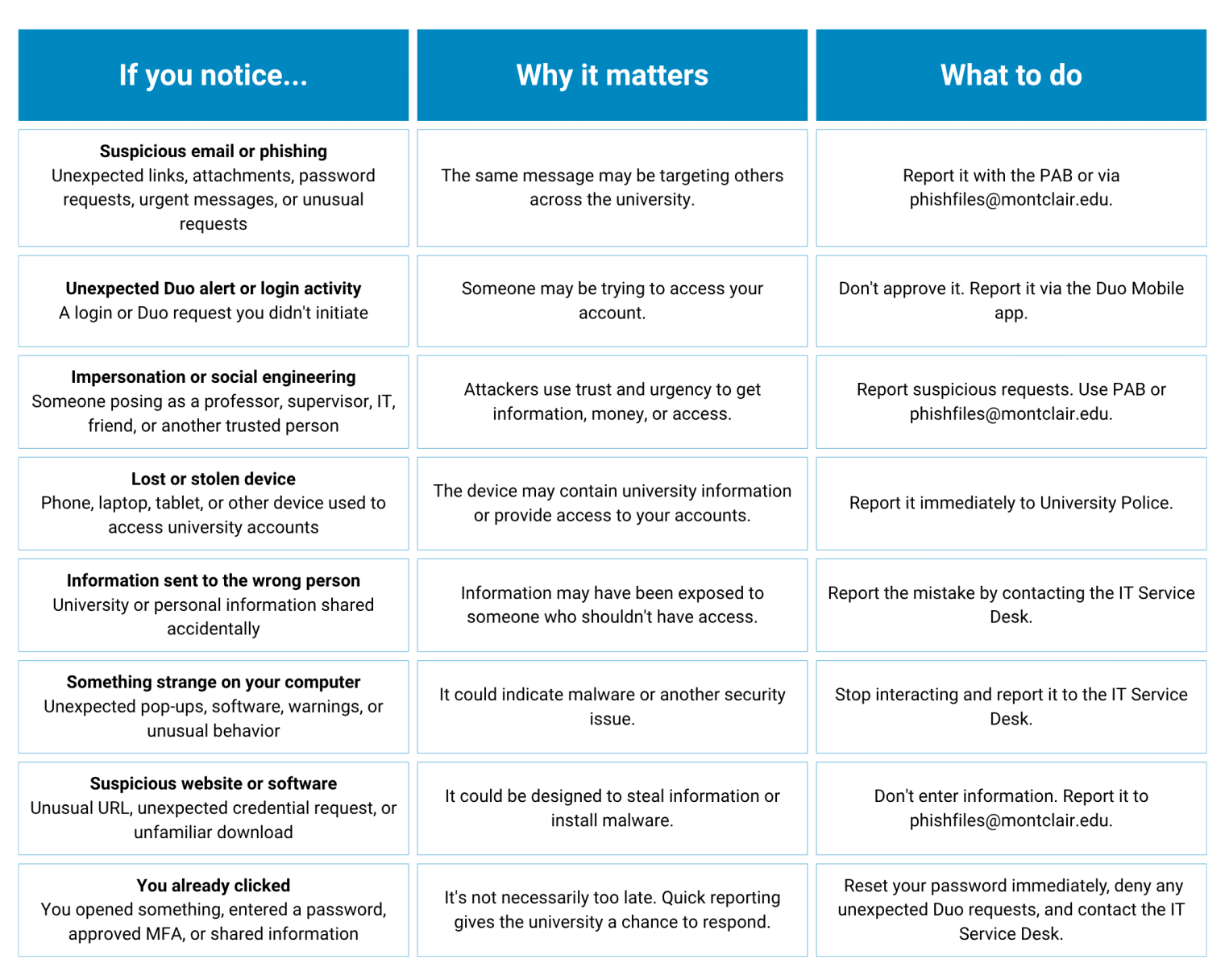
Not sure if something belongs on this list? When in doubt, let the university know. You don’t need to determine whether something is definitely malicious. Sharing your concern gives us an opportunity to assess what happened and determine what to do next.
When a Phishing Attack Looks Like IT
One recent phishing attack targeting our campus started with a message that appeared to come from IT. The email warned recipients that their account was going to be deactivated and directed them to a link to resolve the issue.
The link in question? A fraudulent form designed to collect information such as user’s NetID, password, phone number, and Duo information. But the attack didn’t necessarily stop there.
In some cases, the attacker followed up by texting users while pretending to be IT and asking them to provide their Duo verification code. By combining information collected through the phishing attempt with social engineering, attackers could attempt to gain access to the user’s account.
Why does it matter?
Because a compromise account can become a gateway to more than one problem.
When an attacker gains access to a Montclair account they may use it to send additional phishing messages, making the next message appear more trustworthy because it comes from a real Montclair account.
Depending on what the account can access, attackers may also attempt to reach other systems and make unauthorized changes.
For example, a compromised account could potentially be used to access systems such as Workday and attempt to change sensitive information, including direct-deposit details.
What started as one suspicious email can quickly become a much bigger problem.
What should you look for?
Be cautious when an email:
- Creates urgency by warning that your account will be deactivated
- Directs you to a link to “verify” or “restore” your account
- Requests your password or other account information
- Asks for an MFA or Duo verification code
- Is followed by an unexpected phone call, text, or message from someone claiming to be IT
Your password and MFA codes are yours. Legitimate Montclair support staff should not ask you to provide this information.
When reporting matters.
Someone who receives a phishing scam may be one of many being targeted. When they report the message, the university has the opportunity to investigate, take action, and protect others.
You don’t have to know that an email is malicious. You just have to recognize that something is off and raise the alert.
What If I Made a Mistake?
Maybe you clicked a link, opened an attachment, approved a Duo request you didn’t initiate, entered your password, or sent information to the wrong person.
You’re human. Mistakes happen. Don’t wait to ask for help.
The sooner the university knows, the sooner the appropriate actions can be taken. Don’t be embarrassed. Don’t try to hide it. We’ve got your back.
You may never know what happens after you submit a report. But your report gives us a chance to investigate, respond, and protect the community. Don’t wonder. Report.
Want to Learn More?
National Cybersecurity Alliance | Hacked Accounts: What to Do Right Now
FTC | How To Protect Your Phone From Hackers
FTC | What To Know About Identity Theft
FTC | Email or social media hacked? Here’s what to do
FTC | Hijacked Computer: What to Do
FTC | What To Do After a Data Breach
USA.gov | Identity theft
- Published
- Type
- Topic