
[Phish Alert] Fake Document Approval Emails
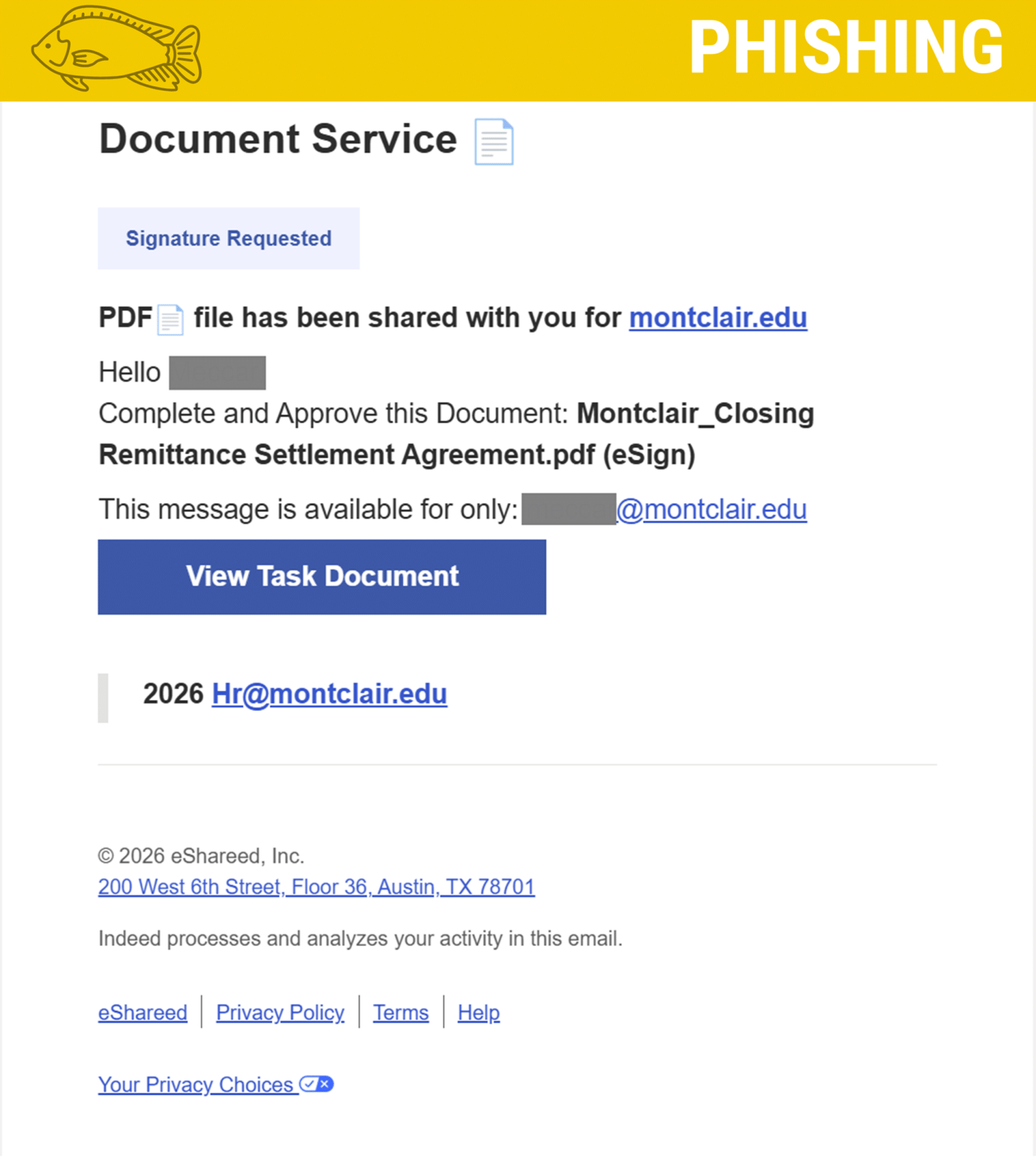
A new phishing campaign targeting campus email accounts impersonates official document signing requests regarding a "Closing Remittance Settlement Agreement." The fraudulent emails use automated scripts to display recipient NetIDs and aim to trick users into revealing their login credentials.

What Happened
A phishing email is targeting our campus community. The email asks you to view and sign a document with a name like "Closing Remittance Settlement Agreement.pdf".
How It Looks Legitimate
- Inboxes: The sender uses a real email delivery service, which allows the message to bypass basic spam filters and reach your primary inbox.
- NetID Personalization: The attackers use automated scripts to pull your NetID username and place it directly into the email text and greeting, making the request appear customized for you.
How We Know It's a Phish
- Unusual Language: University departments do not send legal settlement agreements out of the blue using generic email templates.
- Fake Links: Hovering over the "View Task Document" button reveals a web address pointing to an outside site instead of an official university portal.
- Mismatched Footer Text: The bottom of the email mixes copied footer templates from different companies (like eShared and Indeed) alongside random text strings (2026 Hr@montclair.edu). Attackers include these extra terms to confuse automated security scanners.
What Happens If You Click the Link?
Clicking "View Task Document" takes you to a fake login page built to steal your NetID and password.
If you enter your credentials, attackers can gain access to your account, personal information, and university systems.
What You Should Do
- Do not click any links.
- Report the email using the Phish Alert Button (PAB) in your inbox, this will remove it from your inbox.
- If you entered your password on the fake page: Change your NetID password immediately and contact the IT Service Desk.
Additional Notes
- Remember: IT will never ask for your password or Duo codes, ever.
- Information Technology will not ask you to verify accounts or submit passwords through unofficial forms or unexpected email links.
- Do you think you’ve fallen for a scam? Did you share personal information? Downloaded malicious content? Please contact the IT Service Desk.
- Use the Knowbe4 Phish Alert Button (PAB) to report malicious emails directly to the Information Security team for review. If you are not using the Gmail client please forward the email to phishfiles@montclair.edu.
- Don't have the PAB? Contact the Phish Files and let us know! We will be able to assist with getting you access.
Always use the “hover over” technique to check web links before clicking! For more security tips please visit the Phish Files!
- Published
