[Phish Alert] Response collection paused
What Happened
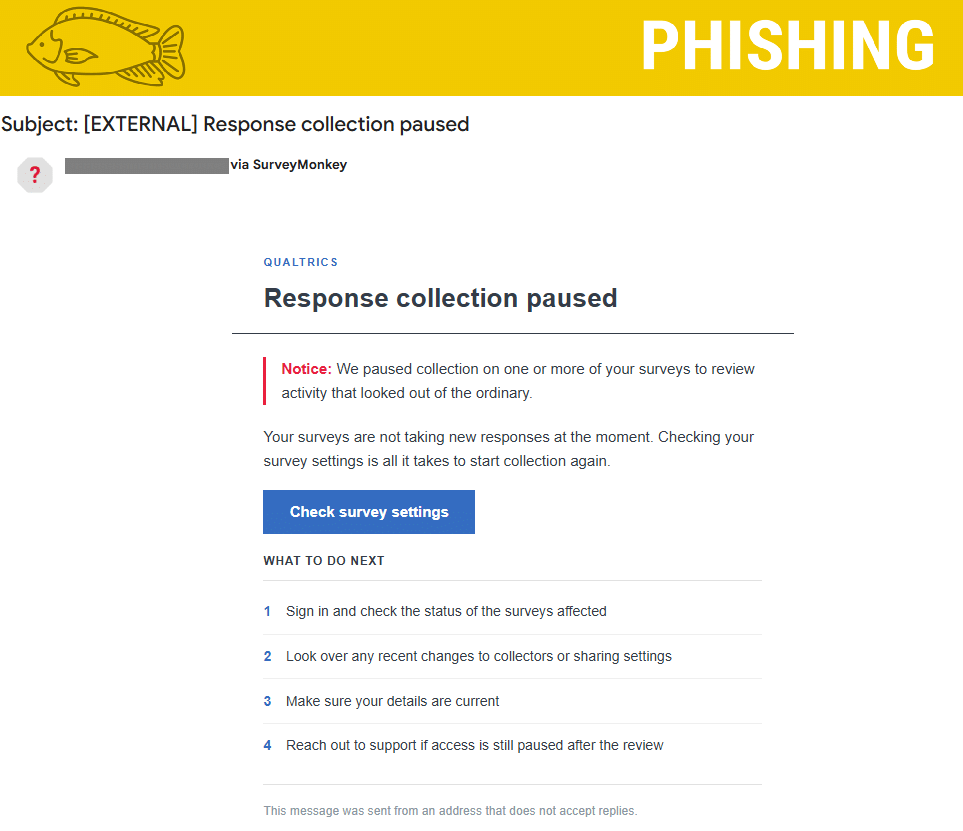
A phishing email impersonating Qualtrics was sent to users, claiming that response collection on one or more of their surveys had been paused due to unusual activity.
The email claims Qualtrics detected activity that appeared out of the ordinary and temporarily stopped accepting new survey responses. It instructs recipients to check their survey settings to restore collection.
The initial link points to a SurveyMonkey URL, but clicking it redirects users to a fraudulent Qualtrics login page:
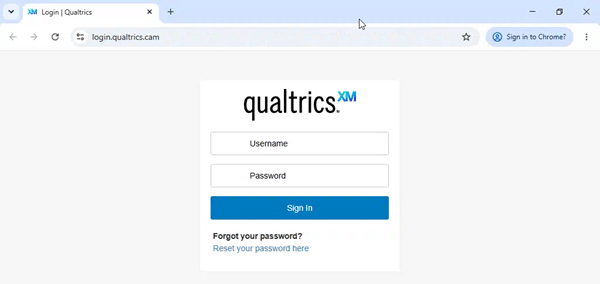
This fake login page is designed to impersonate Qualtrics and potentially steal users' login credentials.
How It Looks Legit
- Familiar branding: The message includes the Qualtrics name and branding.
- Professional formatting: The email uses a clean design, a prominent notification, and numbered instructions.
- SurveyMonkey association: The sender information references SurveyMonkey, and the button initially points to a surveymonkey.com URL.
- Sense of urgency: By suggesting that surveys are no longer accepting responses, the email encourages recipients to act quickly without verifying the notification.
How We Know It's a Phish
- Mismatched branding: The email claims to be a Qualtrics notification but uses a SurveyMonkey-associated sending identity.
- Redirect to a suspicious domain: Although the button initially points to a surveymonkey.com tracking URL, it redirects users to login.qualtrics.cam. The final destination is not the legitimate Qualtrics website.
- Lookalike domain: The attackers use qualtrics.cam to imitate the legitimate Qualtrics domain. The unusual .cam extension is a major warning sign.
- Credential harvesting: The final destination is a fake Qualtrics login page designed to capture usernames and passwords.
What Happens When You Click?
Clicking the "Check survey settings" button initially takes users to a SurveyMonkey tracking URL. This URL acts as an intermediary and redirects the browser to: https://login.qualtrics.cam/
If you enter your username and password, that information may be captured by the attackers and used to access your account or attempt to compromise other accounts where you reuse the same password.
Simply opening the link does not necessarily mean your account has been compromised. The primary risk is entering information into the fraudulent login page.
What You Should Do
- Do not click the link: Avoid clicking the "Check survey settings" button or visiting the fraudulent website.
- Do not enter your credentials: Never provide your username or password on a website you have not independently verified.
- Report the email: Use the Phish Alert Button (PAB).
- If you entered your credentials: Change your password immediately and contact the IT Service Desk.
- Verify notifications independently: If you are concerned about your Qualtrics account or survey status, navigate to Qualtrics using a trusted bookmark or a known legitimate website address rather than clicking links in unexpected emails.
Additional Notes
- Remember: IT will never ask for your password or Duo codes, ever.
- Information Technology will not ask you to verify accounts or submit passwords through unofficial forms or unexpected email links.
- Do you think you’ve fallen for a scam? Did you share personal information? Downloaded malicious content? Please contact the IT Service Desk.
- Use the Knowbe4 Phish Alert Button (PAB) to report malicious emails directly to the Information Security team for review. If you are not using the Gmail client please forward the email to phishfiles@montclair.edu.
- Don't have the PAB? Contact the Phish Files and let us know! We will be able to assist with getting you access.
Always use the “hover over” technique to check web links before clicking! For more security tips please visit the Phish Files!
- Published
- Type
- Topic