[Phish Alert] TikTok Data Recruitment Center
This article explains how scammers impersonate TikTok recruiters through SMS and external messaging apps to trick users into paying fees for fake “task” or job opportunities. It highlights common red flags such as unofficial sender addresses, pressure to move conversations off-platform, and advance-fee scam tactics, and also provides steps for reporting suspicious messages.

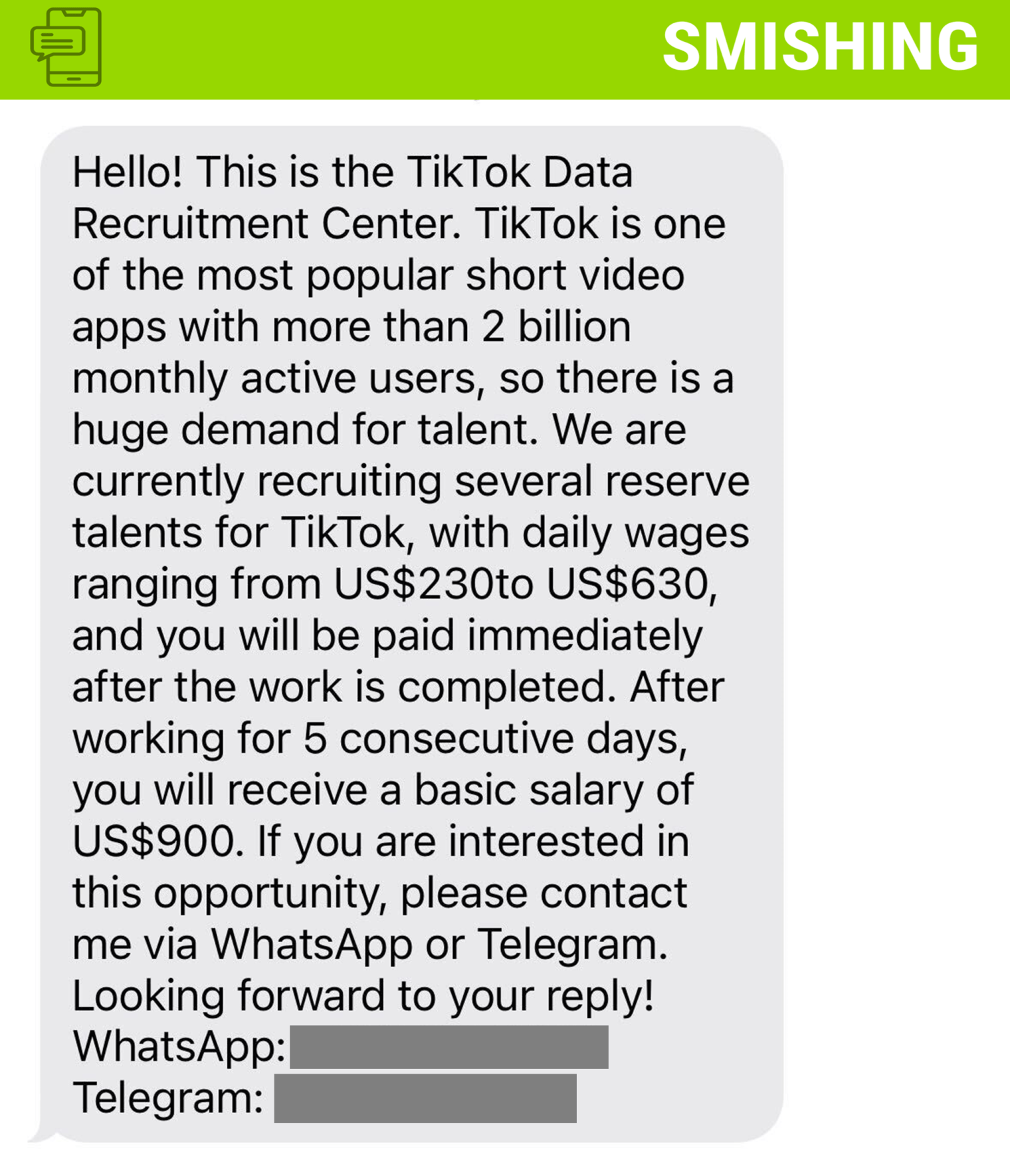
Why this is phishing?
- TikTok does not recruit via SMS, emails from free domains, or external apps
- Sender is either a random telephone number or email address
- Directs user to WhatsApp or an external app, where they’re asked to pay a fee to unlock tasks or higher earnings
- These types of scams often features “task apps”. You’ll do a few and hit a paywall. Once money is deposited you cannot withdraw it — a classic advance-fee scam
How to Report
- Open TikTok and navigate to your Profile.
- Tap the ☰ Menu (top right) → Settings and privacy.
- Go to Safety → Report a problem or Account and safety → Avoid phishing → Report suspicious message
- Describe the issue: e.g. “I received a smishing text claiming to be from TikTok recruitment”—and include details or screenshots.
- Use the “Chat with us” option if you don’t find a fitting category
- Report SMS to Your Carrier: Forward the suspect text to 7726 (SPAM) to alert your carrier and stop further messages
Additional Notes
- Remember: Information Technology will never text you. We will also never request your password or Duo codes, ever.
- Information Technology will not ask you to verify accounts or submit passwords through unofficial forms or unexpected email links.
- Do you think you’ve fallen for a scam? Did you share personal information? Downloaded malicious content? Please contact the IT Service Desk.
- Use the Knowbe4 Phish Alert Button (PAB) to report malicious emails directly to the Information Security team for review. If you are not using the Gmail client please forward the email to phishfiles@montclair.edu.
Always use the “hover over” technique to check web links before clicking! For more security tips please visit the Phish Files!
- Published