
[Phish Alert] 2026 Event Calendar For Montclair State University
IT has identified and removed a phishing campaign impersonating the University President. The email, titled “2026 Event Calendar For Montclair State University”, was sent from an external account and directed recipients to a fraudulent calendar link. Learn how to spot the warning signs and what to do if you receive a similar message.

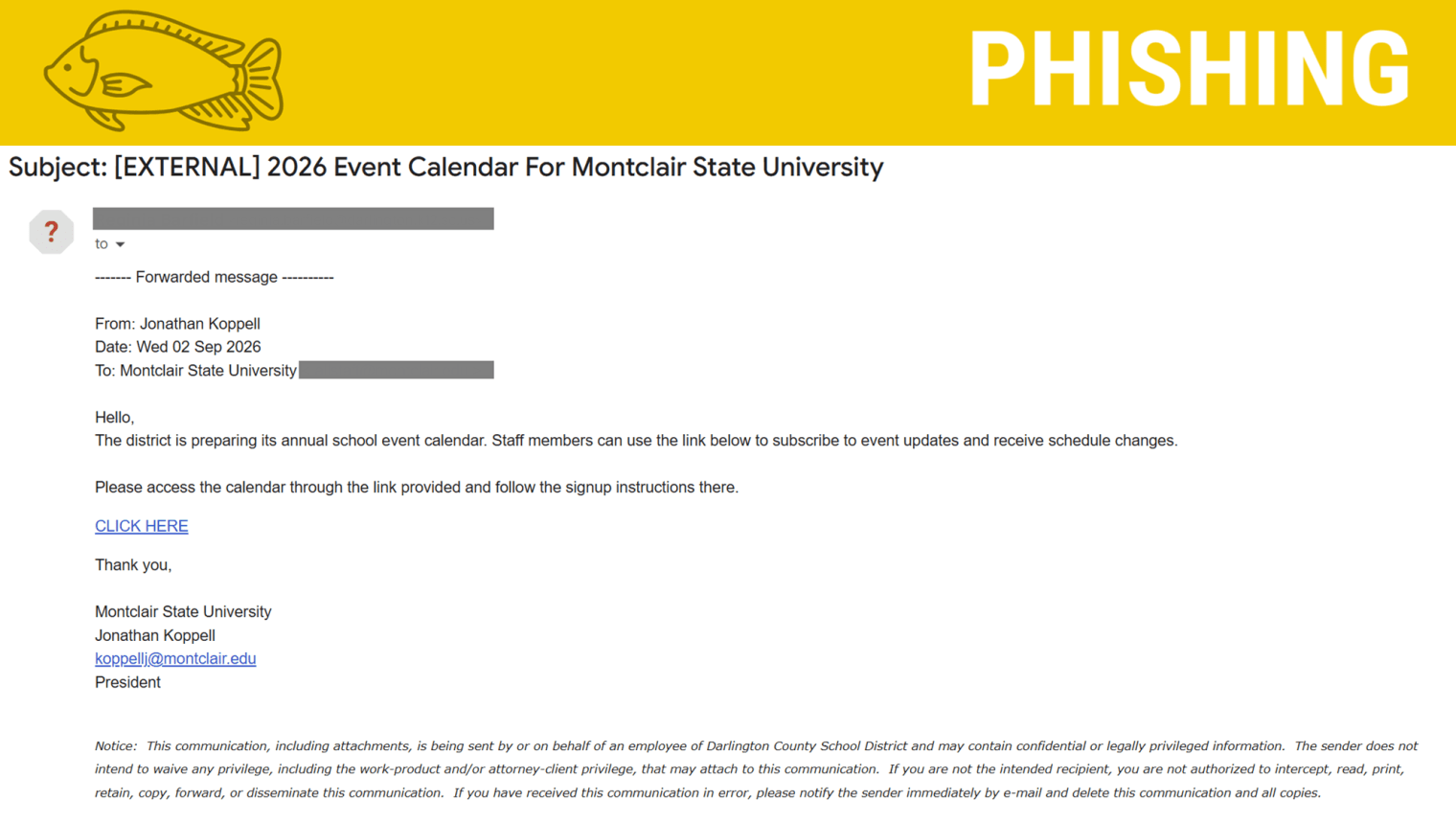
Information Security recently identified a phishing email impersonating the University President. The email was sent from an external account and attempted to direct recipients to a fraudulent calendar link.
What Happened
A phishing email with the subject “2026 Event Calendar For Montclair State University” was sent to members of the University community.
The message appeared to be a forwarded communication from the University President and asked recipients to click a link to access the University's event calendar and subscribe to event updates.
Information Security identified the phishing campaign and removed the messages from inboxes to help prevent further compromise.
How It Looks Legitimate
- It referenced the President Koppell, creating a sense of authority.
- It referenced an event calendar, which is a reasonable request in a university environment.
- It used language encouraging recipients to access the calendar and receive schedule updates.
- The message appeared to be forwarded from the President, rather than immediately appearing to be an unsolicited message from an unknown sender.
These details can make a phishing message seem credible at first glance.
How We Know It's a Phish
- The actual sender was an external email account.
- The email attempted to direct recipients to an external link rather than a known Montclair calendar or website.
- The request was unexpected and asked users to follow a link to sign up for calendar updates.
- The message used executive impersonation to establish credibility and encourage recipients to act.
Tip: Don't rely only on the display name or signature name. Always check the actual sender's email address before trusting a message, especially when it appears to come from a University executive.
What Happens If You Click the Link?
- The link in this phishing email leads to a fake sign-in page designed to look like a legitimate Microsoft login.
- The phishing page then:
- Prompts you for your email address and password.
- Displays a verification code prompt, asking you to enter a code sent to your email.
- Claims that verification was successful and attempts to redirect you elsewhere.
Never enter your Montclair password or Duo MFA codes into a page reached through an unexpected email link.
What To Do
If you receive a suspicious email:
Stop: Don't click links or open attachments.
Check: Look carefully at the actual sender's email address and verify unexpected requests through a trusted method.
Report: Use the Phish Alert Button (PAB) to report directly to Information Security.
Get help: If you clicked the link, entered your University credentials, or believe your account may have been compromised, contact the IT Help Desk immediately.
Remember
A familiar name does not make an email legitimate.
When an unexpected message appears to come from the President, another executive, or someone you know, check the actual sender address and think before you click.
Additional Notes
- Remember: IT will never ask for your password or Duo codes, ever.
- Information Technology will not ask you to verify accounts or submit passwords through unofficial forms or unexpected email links.
- Do you think you’ve fallen for a scam? Did you share personal information? Downloaded malicious content? Please contact the IT Service Desk.
- Use the Knowbe4 Phish Alert Button (PAB) to report malicious emails directly to the Information Security team for review. If you are not using the Gmail client please forward the email to phishfiles@montclair.edu.
- Don't have the PAB? Contact the Phish Files and let us know! We will be able to assist with getting you access.
Always use the “hover over” technique to check web links before clicking! For more security tips please visit the Phish Files!
- Published

