[Phish Alert] “Final Notice” Student Account Verification Scam
This phishing campaign uses urgent, fear-based messages about account and financial aid access, impersonating university offices and pressuring users to act quickly through fake verification links, but it is not legitimate and is designed to steal login credentials.

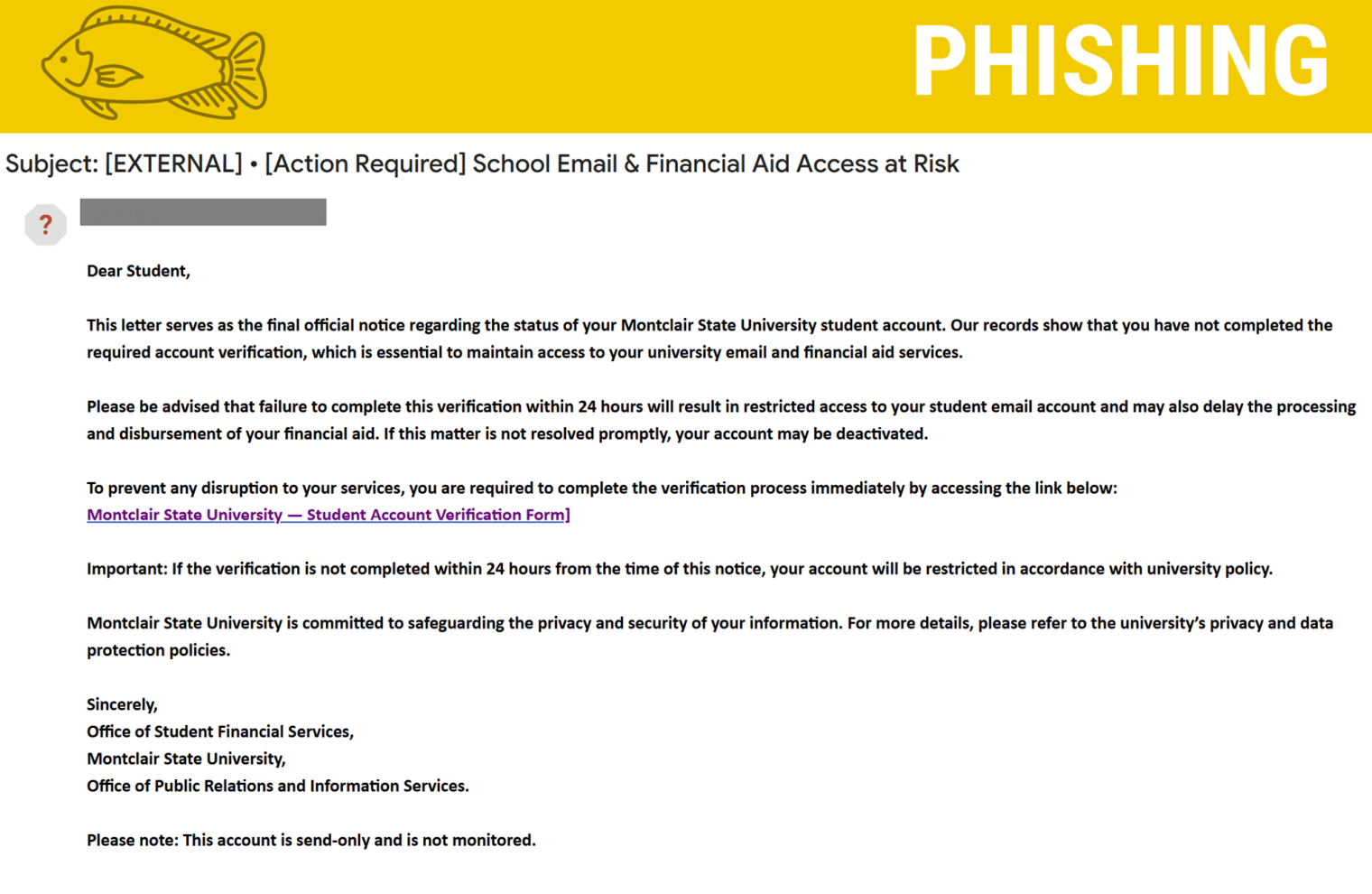
Known Subject Lines
- Immediate Action Needed: Account Verification Required
- [Action Required] School Email & Financial Aid Access at Risk
We’re seeing phishing emails sent to students that claim your account is at risk if you don’t complete a verification process. These messages are designed to create panic and trick you into clicking a malicious link.
Why This Looks Real
Cybercriminals are getting more convincing. This email uses:
- Urgency and pressure
Phrases like “final notice” and a 24-hour deadline push you to act fast. - Important account threats
Mentions of losing access to email and financial aid make it feel serious. - Official-sounding language
Terms like “in accordance with university policy” make it seem legitimate. - Familiar departments
References to offices like Student Financial Services add credibility.
Why This Is Fake
Look closer and you’ll spot the red flags:
- Generic greeting
“Dear Student” instead of your name. - Suspicious link
The “Student Account Verification Form” is not a trusted university link. - Threatening consequences
Immediate restrictions or deactivation within 24 hours is a common scare tactic. - Unusual request
Legitimate university offices will not ask you to verify sensitive information through unsolicited email links. - Discourages follow-up
Claims the account is “send-only” and not monitored.
What You Should Do
If you receive this email:
- Do NOT click the link
- Do NOT enter your login information
- Report it immediately using the Phish Alert Button (PAB)
If you already interacted with it:
- Change your password immediately
- Report it via the PAB
Additional Notes
- Remember: Information Technology will never text you. We will also never request your password or Duo codes, ever.
- Information Technology will not ask you to verify accounts or submit passwords through unofficial forms or unexpected email links.
- Do you think you’ve fallen for a scam? Did you share personal information? Downloaded malicious content? Please contact the IT Service Desk.
- Use the Knowbe4 Phish Alert Button (PAB) to report malicious emails directly to the Information Security team for review. If you are not using the Gmail client please forward the email to phishfiles@montclair.edu.
Always use the “hover over” technique to check web links before clicking! For more security tips please visit the Phish Files!
- Published