[Phish Alert] Chief Human Resources
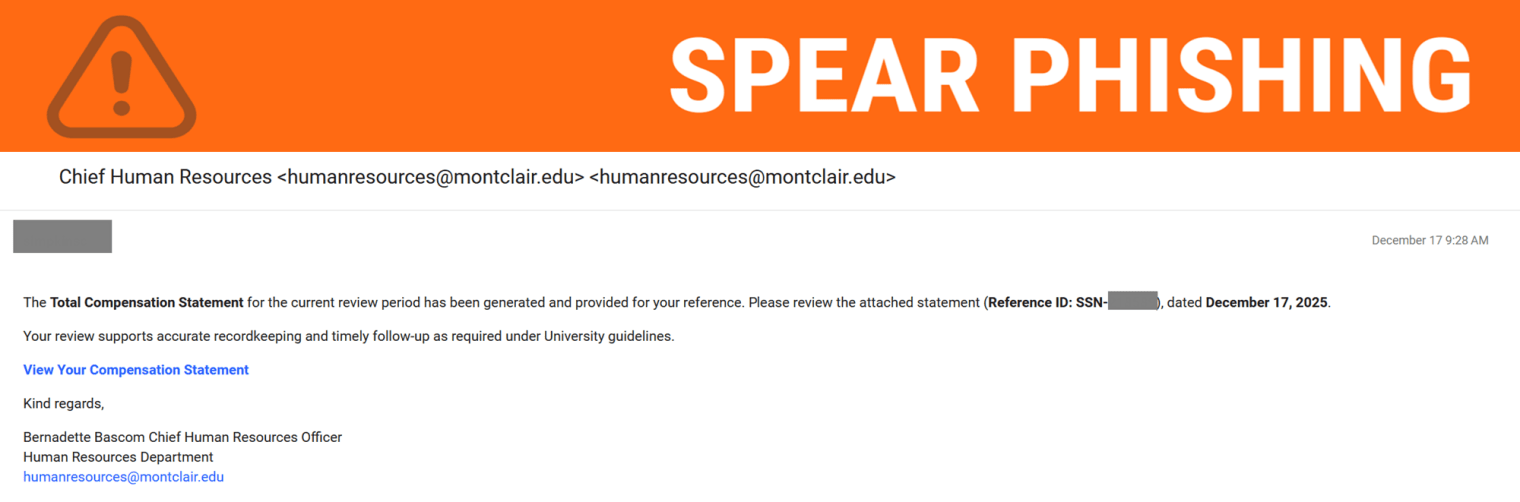
This phishing email impersonates Human Resources using urgent, official-sounding language, fake reference details, and a spoofed internal-style address to appear legitimate.

Why this looks valid:
- Urgency & Importance: It uses professional language regarding “accurate recordkeeping” and “University guidelines.”
- Personalization: It includes a fake “Reference ID” to make the document seem specific to you.
- Internal Domain: The email may appear to come from a montclair.edu address, making it seem “safe” at first glance.
Why this is phishing?
- Sender Mismatch: While the display name says “Chief Human Resources,” the actual sender address is a random user within the domain who is not affiliated with HR.
- Spoofed Subject Line: The subject line contains a manually typed email address (humanresources@montclair.edu) to mask the true sender.
- Identity Error: The person named in the signature, Bernadette Bascom, is not the Chief Human Resources Officer for our institution.
- Suspicious Link: HR will typically direct you to log in directly through the official Workday portal rather than providing a direct link to a “Statement” in an unsolicited email.
Immediate Steps to Take
- Do Not Click: If you receive this email, do not click the “View Your Compensation Statement” link.
- Report It: Use the Phish Alert Button (PAB) to report this email directly to Information Security.
- Verify Sources: Always navigate to official portals (like Workday) via your bookmarks or the university homepage rather than clicking links in emails.
If You Already Clicked or Entered Credentials
If you clicked the link and entered your login information, please take the following actions immediately:
- Duo Alerts: If you begin receiving suspicious or unexpected Duo push requests, deny them and reset your password immediately. This indicates an attacker is actively trying to use your stolen credentials.
- Workday Monitoring: Check your Workday account for any unauthorized changes, specifically regarding your banking information or direct deposit settings.
- Contact Us: If you see any unusual activity or receive weird emails regarding your account changes, use the Phish Alert Hook (PAB) and contact HR immediately.
- Published