Workday Student
Workday Student will become Montclair State University’s new student information system in 2027, replacing our current system, Banner. Students, faculty, and staff will have instant access to more information, all in one place, and spend less time on administrative tasks.
Jump to: FAQs | Timeline | Demo Library | News & Announcements | Project Team
Workday Student Town Hall
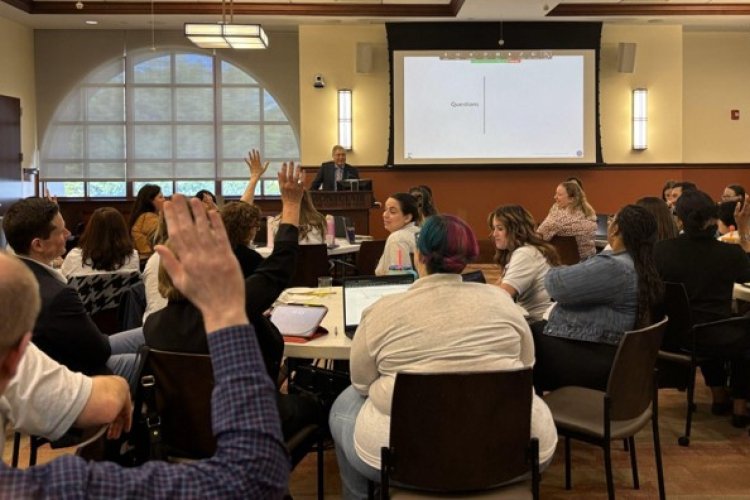
Thank you for joining us at our Workday Student Town Hall on September 23! The recording will be shared soon. In the meantime, still have questions? Use our Contact Form to share them with us.
Transforming the Student Experience
Workday Student will become Montclair State University’s new student information system in 2027.
Workday Student makes it easier to manage your academic journey. From registering for classes and tracking your degree progress, to accepting financial aid and paying your bill, you'll be able to complete everyday tasks in one place.
It has a modern, mobile-friendly design and lots of self-service options, so you'll spend less time navigating systems and more time focusing on your success.
Empowering Employees for What's Next
Workday Student is designed to support the way faculty and staff work and meet new challenges, by bringing key academic and administrative processes together in one system.
A modern interface, built-in messaging and scheduling tools, customizable reports, and stronger data and compliance capabilities will help streamline everyday work, improve access to information, and support more informed decision-making over time.
Join the Change Network!
The Change Network is your front-row seat to influence this transformation in just 1-2 hours a month. See live demos, get early access to functionality, share feedback that shapes the project, and support your campus community through change.
Guiding Principles for the Project
Transformation: Deliver transformational change that improves processes, efficiencies, and scalability.
Efficiency: Use Workday functionality and best practices to minimize operational overhead and maximize self-service capabilities.
Empowerment: Embrace collaborative, trustworthy, and inclusive teams that empower decision-makers and incorporate feedback from students and faculty.
Engagement: Adopt a community-centric approach to develop new strategies, policies, and partnerships.
Timeline
Workday Student functionality will go live in stages during the 2026-2027 academic year. The first academic year in which we will operate entirely within Workday Student is 2027-28.
Summer 2024 - Spring 2026: Design & Build - complete!
Spring 2026: Test - complete!
Fall 2026: Prepare for Launch
- September 23, 2026: Workday Student Town Hall and Receptions
- September 28 - October 2, 2026: Workday Student Preview Week (end user testing by volunteer students, faculty, and staff)
- November 9 - November 20, 2026: Mock Term (full term simulation and testing by volunteer students, faculty, and staff)
- January 2027: Training for faculty and staff begins
- February 2027: Training for students begins
- March 2027: Registration Labs and Help Desk Support begin
Spring 2027: First registration in Workday Student
Winter 2028: Project Conclusion – Workday Student fully live
Workday Student Demo Library
Review short demo videos in our growing demo library!
- Introduction
- Basic Navigation
- Academics Hub
- The Student Profile
- Registration Part 1: Registering With a Saved Schedule
- Registration Part 2: Registering Without a Saved Schedule
- Rosters and Grading Part 1: The Teaching App
- Rosters and Grading Part 2: Rosters
- Rosters and Grading Part 3: Grading
- New Student Onboarding
News & Announcements
Executive Sponsors

Margaree Coleman-Carter
- Interim Vice President, Student Development and Campus Life

Benjamin Durant
- Chief Operating Officer and Senior Vice President

Fatma Mili
- Interim Provost and Senior Vice President for Academic Affairs

Suresh Murugan
- Vice President for Information Technology and Chief Technology Officer

Yosmeriz Roman
- Chief Enrollment Management Officer and Vice Provost
Steering Committee

James Anderson
- Principal for Enrollment Management Integrations, Workday Student Project

Delavar Basha
- Director, PMO Operations

Joanne Cote-Bonanno
- Senior Associate Provost for Curriculum, Assessment, and Accreditation

Larissia Crosby
- Associate Vice President and Controller

Danielle Insalaco-Egan
- Associate Provost for Undergraduate Education

Aylin Solu-Brandon
- University Registrar

Kathy Zamora
- Academic Affairs Implementation Specialist, Workday Student Project
Functional and Technical Workstream Leads
James Anderson
- Principal for Enrollment Management Integrations, Workday Student Project

Kyle Dobbeck
- Senior Director of Curriculum

Andrew Gerstmayr
- Director of Student Systems

Melissa Ginotti
- Associate Vice President, SDCL Division Operations and Strategic Initiatives

Klavdiya Hammond
- Director, Data and Analytics
Danielle Insalaco-Egan
- Associate Provost for Undergraduate Education

Jimmy Lau
- Associate Director for Systems Support

Hannah Lindeblad
- Director of Student Communications

Jordanna Maziarz
- Senior Director of Undergraduate Admissions

Jill Pustelniak
- Director of Human Resources Operations and Human Capital Management

Hina Shamim
- Associate Director, Student Systems Development
Aylin Solu-Brandon
- University Registrar

Greg Ventura
- Quality Assurance Manager
Kathy Zamora
- Academic Affairs Implementation Specialist, Workday Student Project
We want to hear from you!
Have questions or concerns? Please reach out and share your ideas via the contact form below. Your questions, suggestions, and feedback are critical inputs in our Workday Student project.
Your feedback will be reviewed by the project team and considered as we continue to design the system and plan how Workday Student is rolled out to users across the University.