[Phish Alert] 🚨New Week Staff & Faculty School Notice !!!🚨
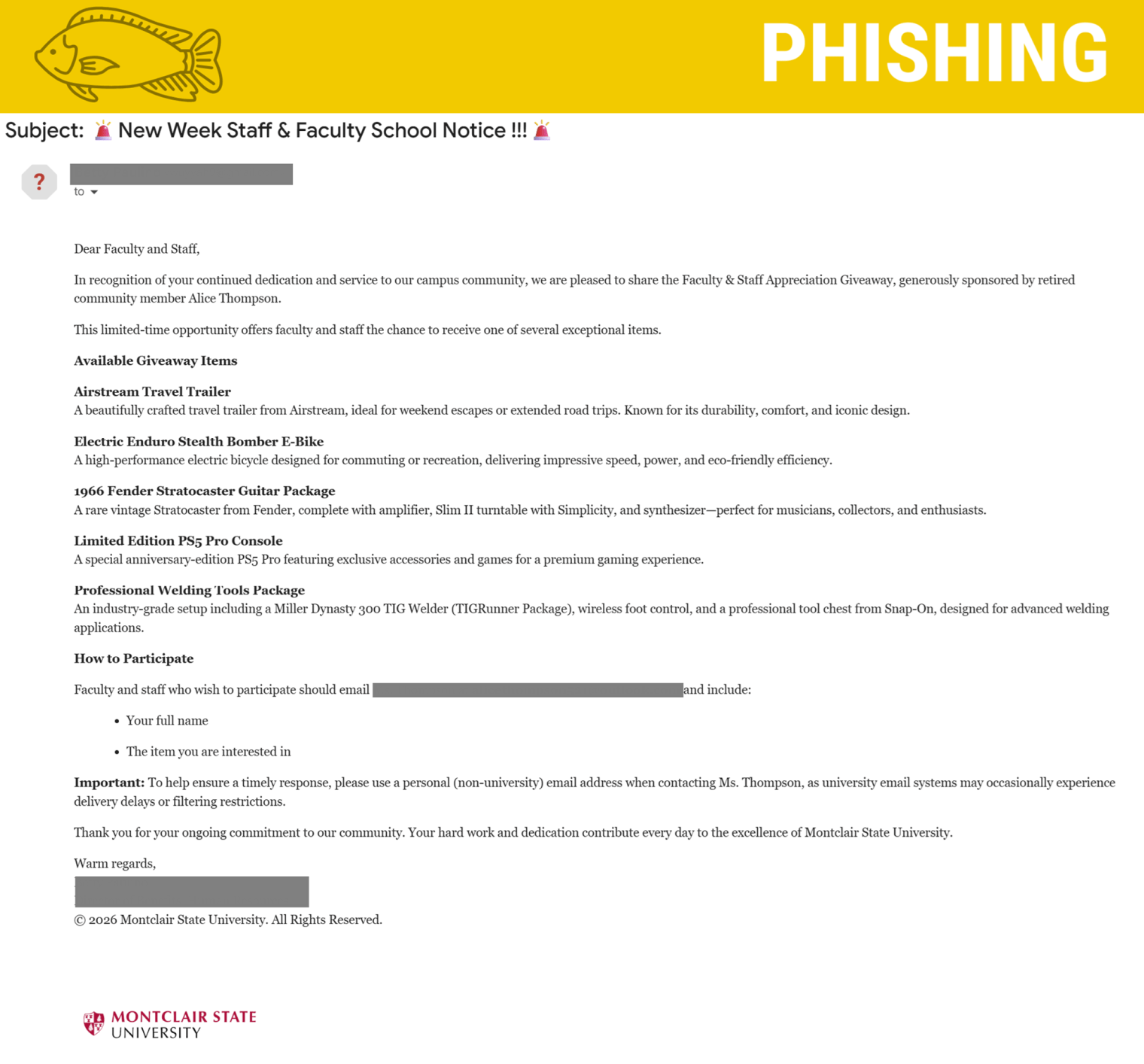
This phishing email uses a familiar campus name, professional tone, and high-value giveaway items to appear legitimate, but it is a scam because it comes from an external sender and asks users to respond via personal email. Responding can expose personal information and lead to further phishing or identity theft.

Why This Email May Look Legitimate
Cybercriminals design phishing emails to appear trustworthy. This message uses several tactics to lower suspicion:
- Familiar Name in the Signature
The email includes the name and title of a real member of our campus community, making it appear officially endorsed. - Professional Tone and Formatting
The message is written in formal language and references “faculty and staff appreciation,” which aligns with legitimate Montclair communications. High-Value, Recognizable Brands
The giveaway items reference well-known products, including:- Airstream travel trailer
- Stealth Bomber E-Bike
Referencing recognizable brands makes the offer feel more credible.
- Old University Logo
The message uses an outdated Montclair logo to appear official.
Signs This Email Is Phishing
Despite its professional appearance, several red flags indicate this is not legitimate:
- External Sender Address
The email originates from an external email address, not an official Montclair account. - Mismatched Contact Information
Recipients are instructed to email a different external address that is not affiliated with the university. - Request to Use a Personal Email Address
The message specifically asks you to use a personal (non-university) email account to respond.- This is a major red flag. Scammers attempt to move conversations off official systems to avoid security monitoring.
- Too Good to Be True Giveaway
Extremely high-value items are being offered with no official webpage, registration form, or verification process. - Non-Existent Sponsor
The email references a “retired community member” who does not exist. - Urgency & Limited-Time Framing
Phrases like “limited-time opportunity” are designed to pressure quick action. - Unusual Subject Line & Excessive Punctuation
Multiple exclamation points and emoji-heavy formatting are common in phishing campaigns.
What Are the Risks?
If you respond to this email, you could:
- Expose your full name and personal email address
- Open the door to follow-up phishing attempts
- Be targeted for financial scams
- Become a victim of identity theft
- Be added to scammer distribution lists for future attacks
Even a simple reply confirms your email is active, making you a higher-value target.
What Should You Do?
If you receive this message:
- Do not reply.
- Do not use your personal email address to respond.
- Do not share any personal information.
- Report the email using the Knowbe4 Phish Alert Button (PAB).
- Delete the message after reporting it.
Additional Notes
- Remember: Information Technology will never text you. We will also never request your password or Duo codes, ever.
- Information Technology will not ask you to verify accounts or submit passwords through unofficial forms or unexpected email links.
- Do you think you’ve fallen for a scam? Did you share personal information? Downloaded malicious content? Please contact the IT Service Desk.
- Use the Knowbe4 Phish Alert Button (PAB) to report malicious emails directly to the Information Security team for review. If you are not using the Gmail client please forward the email to phishfiles@montclair.edu.
Always use the “hover over” technique to check web links before clicking! For more security tips please visit the Phish Files!
- Published