[Phish Alert] Amazon Item Recall
This phishing text message is designed to look legitimate by using safety-related language like “recall” and “safety standards,” a professional tone, and the promise of a full refund to encourage urgency and quick action.

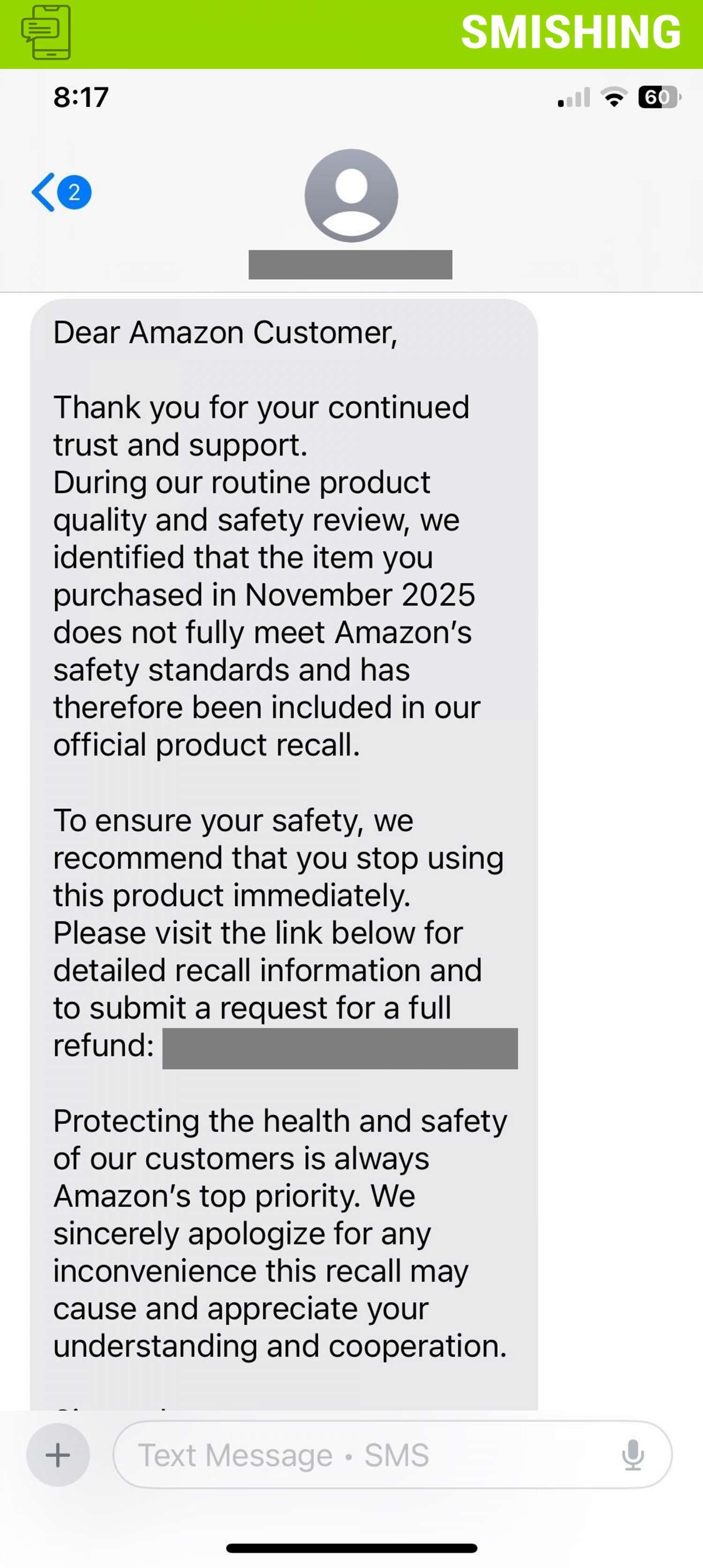
Why this looks valid:
- Safety Scare: They use scary words like “recall” and “safety standards” to make you feel like you must act fast to protect yourself.
- Professional Tone: The text is polite, apologizes, and thanks you for your business. It sounds like a big company wrote it.
- Promise of Money: They offer a “full refund,” which is a powerful incentive to click the link immediately before checking if it’s real.
Why this is phishing?
A legitimate recall notice from Amazon would not look like this text message. Before you ever click a link in a text, look for these simple clues:
- Missing Details: The text mentions a vague “item purchased in November 2025” (or a different non-specific date) with no name or order number.
- What Amazon Would Do: A real notice would name the exact product (e.g., “The XYZ Coffee Maker”) and likely include your specific Order ID.
- The Pressure Link: It demands you click a link in the text to get a refund or more information.
- What Amazon Would Do: Amazon NEVER asks you to click a link in a text message to log in or submit financial details. They want you to log into the official app or website yourself.
- High Pressure: It says you must “stop using this product immediately” to create panic and rush you into clicking the link.
- What Amazon Would Do: While safety is urgent, they provide clear, official channels you can check yourself, not just a random text link.
Additional Notes
- Remember: Information Technology will never text you. We will also never request your password or Duo codes, ever.
- Information Technology will not ask you to verify accounts or submit passwords through unofficial forms or unexpected email links.
- Do you think you’ve fallen for a scam? Did you share personal information? Downloaded malicious content? Please contact the IT Service Desk.
- Use the Knowbe4 Phish Alert Button (PAB) to report malicious emails directly to the Information Security team for review. If you are not using the Gmail client please forward the email to phishfiles@montclair.edu.
Always use the “hover over” technique to check web links before clicking! For more security tips please visit the Phish Files!
- Published